Ever wondered how much electricity your powerful gaming PC actually consumes and what it costs you? For busy gamers juggling work, family, and precious gaming time, understanding PC power usage is key to optimizing performance and managing household budgets. This comprehensive guide dives into how much kWh does a gaming PC use, breaking down the factors influencing consumption from high-end GPUs to casual indie titles. We will explore practical strategies for reducing your electricity bill without sacrificing your immersive gaming experience. Discover how to identify energy hogs, optimize settings, and make smart hardware choices that benefit both your wallet and the environment. This article provides actionable tips and real-world insights, ensuring you stay current with 2026 trends, balance your passion with financial savvy, and keep your gaming sessions both thrilling and efficient. Learn to game smarter, not harder, and reclaim peace of mind regarding your energy footprint.
How much KWh does a high-end gaming PC use per hour?
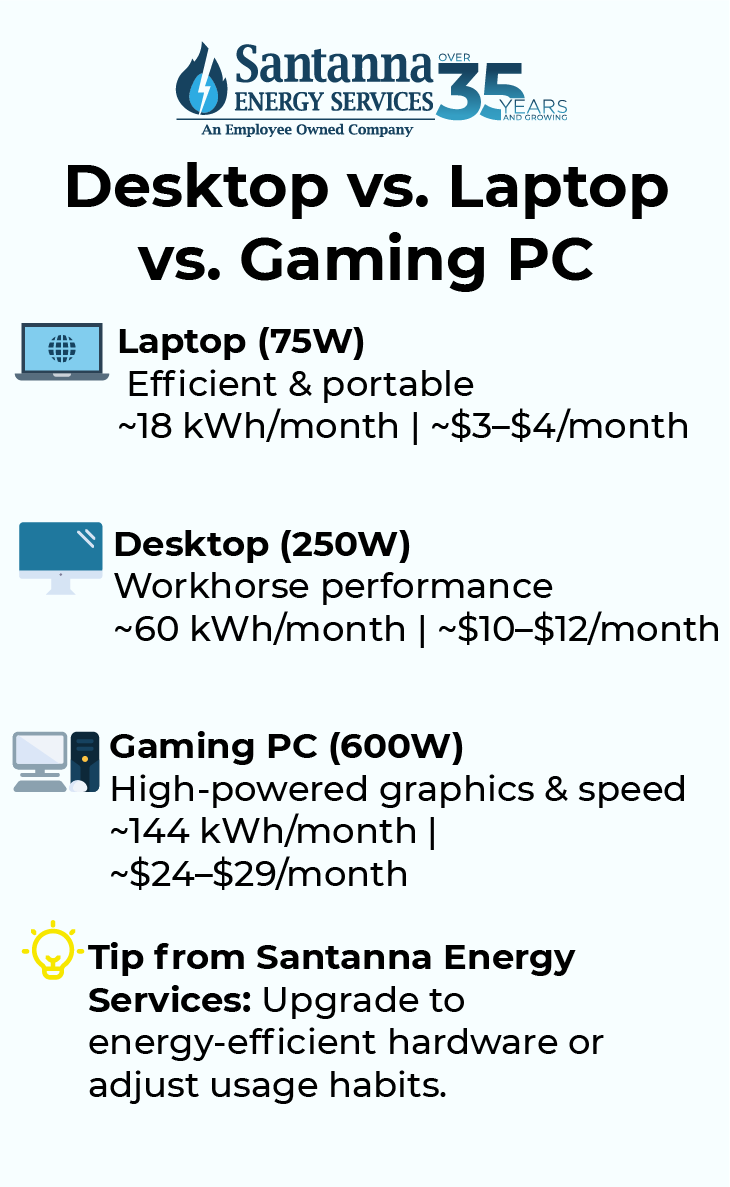
A high-end gaming PC, featuring top-tier GPUs like an RTX 4080 or RX 7900 XTX and a powerful CPU, can typically consume between 400 to 600 watts (W) during intense gaming sessions. This translates to approximately 0.4 to 0.6 kilowatt-hours (kWh) per hour of gameplay. For example, if you game for 3 hours with a 500W PC, that's 1.5 kWh for that session. This figure can fluctuate based on game demands and specific hardware configurations.
What are the primary components responsible for a gaming PC's KWh consumption?
The Graphics Processing Unit (GPU) and the Central Processing Unit (CPU) are the two primary components responsible for the bulk of a gaming PC's kWh consumption. The GPU, especially when rendering demanding titles, often consumes the most power, followed by the CPU, which is crucial for game logic and physics. Other components like the Power Supply Unit (PSU) efficiency, RAM, storage, and cooling fans contribute, but to a lesser extent than the main processors.
How does the type of game I play affect my gaming PC's KWh usage?
The type of game significantly impacts your gaming PC's kWh usage. Graphically intensive AAA titles, particularly those utilizing advanced features like ray tracing or running at 4K resolution, push your GPU and CPU to their limits, leading to higher power draw. In contrast, less demanding esports titles, older games, or casual indie games require less processing power, resulting in lower wattage consumption and reduced kWh usage. Even within a game, settings like resolution and texture quality play a role.
Can power management settings in Windows genuinely reduce my gaming PC's KWh?
Yes, power management settings in Windows, along with GPU driver controls, can genuinely reduce your gaming PC's kWh consumption, especially during idle periods or less demanding tasks. Setting your power plan to 'Balanced' instead of 'High Performance' when not gaming can lower CPU clock speeds. Furthermore, utilizing features like V-Sync, frame rate limiters, or adjusting in-game graphical settings can reduce the GPU's workload, preventing it from constantly drawing maximum power, thus saving energy.
What is the cost of running a gaming PC in terms of electricity per month?
The monthly cost of running a gaming PC depends on its average wattage, your hours of use, and your local electricity rate. For example, if a gaming PC averages 400W and you game 15 hours a week (60 hours a month), it uses 24 kWh monthly (400W x 60h / 1000). If your electricity rate is $0.15/kWh, the monthly cost would be $3.60. High-end systems or longer playtimes would increase this, while lower wattage or less frequent use would decrease it.
Does leaving my PC in 'Sleep' mode save KWh compared to shutting it down?
Leaving your PC in 'Sleep' mode does save KWh compared to full operation, but shutting it down completely is even more energy-efficient. In 'Sleep' mode, your PC consumes a small amount of power (typically 2-10W) to keep RAM active for a quick resume. Shutting down, however, reduces power consumption to near zero (0-1W), with only standby power for the PSU. For extended periods away, shutting down saves more, but 'Sleep' is convenient for short breaks.
Are there any common myths about gaming PC power consumption I should be aware of?
Yes, one common myth is that RGB lighting significantly inflates your electricity bill. While RGB does use power, it's typically a negligible amount (5-15W for a full setup) compared to the hundreds of watts drawn by your GPU and CPU. Another myth is that bigger power supplies consume more power; a larger PSU simply *can* supply more power if needed, but only draws what the components demand, often operating more efficiently at moderate loads than smaller PSUs running at peak.
Balancing epic gaming sessions with real-world responsibilities like work and family is a common challenge for many of us. You love diving into your favorite titles, unwinding after a long day, or connecting with friends in online worlds. But there's often that nagging thought in the back of your mind: exactly how much kWh does gaming PC use, and what's it really adding to your electricity bill? It's a valid concern, especially when you're trying to be smart with your budget and keep things running smoothly at home. You want that high-performance rig, but not at the expense of your peace of mind or your wallet.
This isn't about shaming your passion; it's about empowering you with knowledge. With 87% of US gamers regularly dedicating 10+ hours a week to their hobby, and PC gaming continuing its strong presence alongside mobile and console, understanding your machine's energy footprint is more relevant than ever. This guide is designed for the modern gamer – the one who values relaxation, skill-building, social play, and performance, but also practical solutions and value for money. We'll cut through the hype and give you clear, actionable insights into how much KWh your gaming PC uses, what influences it, and most importantly, how to optimize it. Let's demystify power consumption so you can focus on those headshots, quest completions, and memorable moments with your squad, without worrying about the meter spinning out of control.
What Factors Influence How Much KWh Does Gaming PC Use?
The amount of electricity your gaming PC consumes, measured in kilowatt-hours (kWh), isn't static. Several components and usage patterns significantly impact its overall draw. Think of it like a sports car; it uses more fuel when you're redlining it than when you're cruising. For your PC, the biggest determinants are typically the Graphics Processing Unit (GPU) and the Central Processing Unit (CPU).
A high-end GPU, especially when rendering demanding AAA titles at high resolutions and frame rates, can easily consume 250-400 watts or more on its own. The CPU, while generally less power-hungry than the GPU during gaming, still contributes significantly, particularly in CPU-intensive games or during multitasking. Other components like your power supply unit (PSU) efficiency, RAM, storage drives (SSDs use less than HDDs), motherboard, and peripherals (monitors, speakers, RGB lighting) all add to the total. Even the game you're playing makes a difference; a graphically intense new release will push your system harder than a cozy indie title or an older esports game.
How Can I Calculate My Gaming PC's Electricity Usage in KWh?
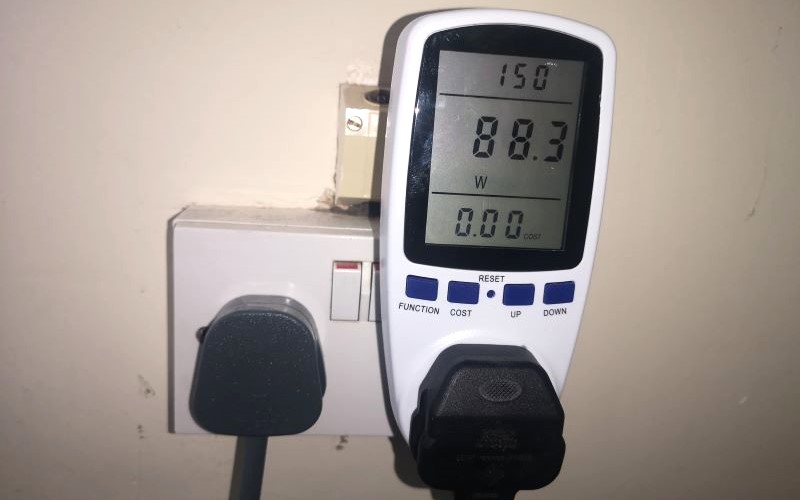
Calculating your gaming PC's electricity usage in kWh is a straightforward process once you know your system's wattage and how long you use it. First, you need to estimate your PC's average power draw in watts. This can be found by looking up your GPU and CPU's typical gaming wattage, or for a more accurate measurement, using a watt meter (also known as a kill-a-watt meter) plugged into your wall outlet. These devices measure the exact power consumption of your PC at any given moment.
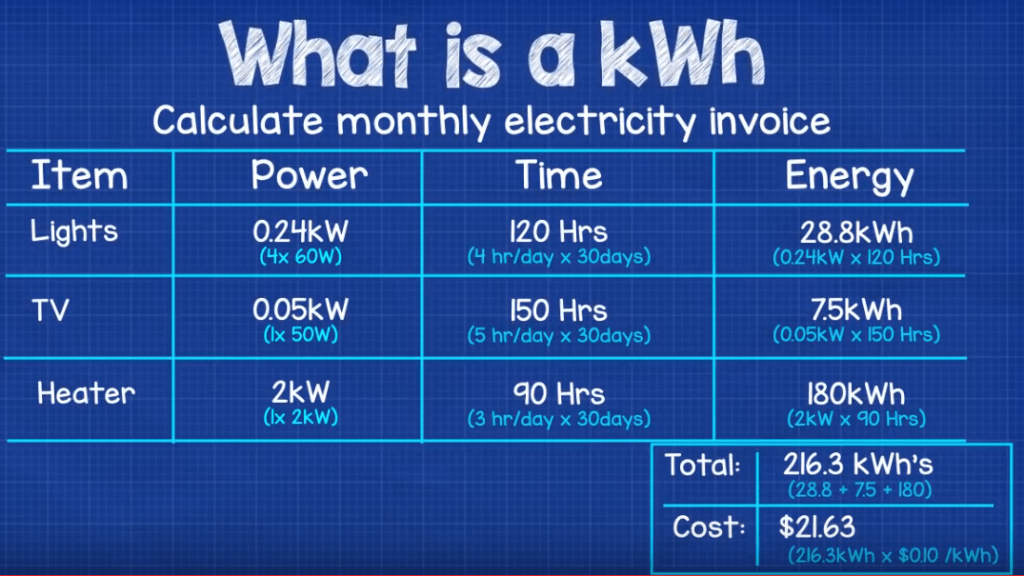
Once you have the wattage (W), the formula is simple:
KWh = (Watts x Hours Used) / 1000
For example, if your gaming PC draws an average of 400W during gaming and you game for 4 hours a day:
Daily KWh = (400W x 4 hours) / 1000 = 1600 / 1000 = 1.6 KWh
Then, to get your monthly usage, multiply by the number of days:
Monthly KWh = 1.6 KWh/day x 30 days = 48 KWh
You can then multiply this KWh total by your local electricity rate (e.g., $0.15 per KWh) to estimate your monthly cost. Checking your utility bill or provider's website will give you your exact rate.
What Is the Average KWh Usage for a Typical Gaming PC?
The average kWh usage for a gaming PC varies widely depending on its components and how it's used. A modest gaming PC with an entry-level to mid-range GPU (like an RTX 3050 or RX 6600) might draw 200-300 watts while gaming. This could translate to around 0.2 to 0.3 kWh per hour of gameplay. On the other hand, a high-end rig featuring a top-tier GPU (like an RTX 4080/4090 or RX 7900 XTX) and a powerful CPU could easily consume 400-600 watts or even more under heavy load, leading to 0.4 to 0.6 kWh per hour.
Considering that many US gamers average 10+ hours of gaming per week, this can add up. For example, a mid-range PC at 300W used for 15 hours a week would consume (0.3 kWh/hour * 15 hours) = 4.5 kWh per week, or about 18 kWh per month. A high-end PC at 500W for the same duration would use 30 kWh per month. These figures are crucial for understanding your potential electricity costs.
Are More Efficient PSUs Worth the Investment for KWh Savings?
Absolutely, investing in a more efficient Power Supply Unit (PSU) can definitely be worth it for kWh savings in the long run. PSUs are rated with an 80 Plus certification (Bronze, Silver, Gold, Platinum, Titanium), indicating their efficiency at converting AC power from the wall into DC power for your PC components. For example, an 80 Plus Gold PSU is at least 87% efficient at 50% load, meaning only 13% of the drawn power is lost as heat.
In contrast, a less efficient PSU might be 70-80% efficient, losing 20-30% of power. While the immediate savings per hour might seem small, over hundreds or thousands of hours of gaming, these small percentages add up. For a PC drawing 400W from the wall with an 80% efficient PSU, 80W is wasted. With a 90% efficient PSU, only 40W is wasted. This difference of 40W, over say 1000 hours of gaming, saves you 40 kWh, which can translate to noticeable monetary savings on your annual electricity bill, especially with rising energy costs. Plus, more efficient PSUs generally generate less heat, potentially contributing to a cooler and quieter system.
Does My Monitor Choice Impact How Much KWh My Gaming Setup Uses?
Yes, your monitor choice absolutely impacts your overall kWh usage, though often less significantly than your PC's core components. Modern gaming monitors, especially larger ones or those with higher refresh rates, can draw a fair amount of power. A typical 27-inch 144Hz 1440p monitor might consume between 30-50 watts during operation. A larger 32-inch 4K 165Hz monitor could draw 60-100 watts or even more.
Factors like screen size, resolution, refresh rate, panel technology (OLED generally consumes more than LCD for bright scenes, but less for dark scenes), and brightness settings all play a role. Running multiple monitors will also increase consumption proportionally. To save energy, consider enabling your monitor's power-saving features, reducing brightness when not critical, and always ensuring it goes into a low-power sleep mode or turns off when not in use. Small changes across all your peripherals collectively contribute to lower overall kWh.
Can Software Settings and Game Optimization Reduce KWh Consumption?
Absolutely! Software settings and in-game optimizations are powerful tools for managing how much kWh your gaming PC uses without needing hardware upgrades. Modern GPUs and operating systems offer various power management options. For instance, enabling V-Sync or G-Sync/FreeSync can prevent your GPU from rendering frames unnecessarily beyond your monitor's refresh rate, reducing its workload and thus power draw. Frame rate limiters, both in-game and through driver software, serve a similar purpose, ensuring your GPU isn't always running at 100% capacity.
Many games also offer extensive graphical settings. Reducing demanding options like ultra-high shadows, ray tracing quality, or anti-aliasing can significantly lower GPU and CPU utilization, directly translating to less power consumption. This is particularly useful for gamers who prioritize smooth gameplay over absolute graphical fidelity, especially in competitive titles. Even setting your Windows power plan to 'Balanced' instead of 'High Performance' when not gaming can make a difference in idle power usage. Smart software choices help you balance performance with efficiency, making your gaming experience more sustainable.
How Do Current Gaming Trends Affect PC Energy Use?
Current gaming trends have a mixed impact on how much kWh gaming PCs use. On one hand, the pursuit of ever-more realistic graphics, higher resolutions (4K, 8K), and advanced technologies like path tracing (an evolution of ray tracing) in major titles constantly pushes hardware to its limits. This demands more powerful GPUs and CPUs, which inherently consume more energy. The rise of VR experiments and high-fidelity simulation games also points towards increased power demands for immersive experiences.
However, other trends offer a counterpoint. The popularity of social and cozy games, many of which are less graphically intensive, means not every gaming session is a power-hungry marathon. Free-to-play titles and esports games are often optimized to run on a wider range of hardware, allowing for lower power consumption if you're not pushing ultra settings. Cloud gaming services, while requiring robust internet, shift the processing power (and thus electricity consumption) to data centers, reducing your local PC's draw. Gamers balancing life and work often gravitate towards games that offer quick fun or social interaction, which don't always demand peak performance, leading to more varied and sometimes lower overall energy use across their gaming habits.
What Role Does PC Maintenance Play in Energy Efficiency?
PC maintenance plays a surprisingly significant role in ensuring your gaming rig runs energy-efficiently. Over time, dust can accumulate inside your PC case, especially on heatsinks and fans. This dust acts as an insulator, trapping heat and making your components run hotter. When components like your CPU and GPU get too hot, they automatically boost their fan speeds to compensate, which uses more power. More importantly, they might also 'thermal throttle,' reducing performance to prevent damage, but still consuming a lot of power while struggling to cool down.
Regularly cleaning your PC (using compressed air to clear dust from fans, radiators, and vents) ensures optimal airflow and cooling. This allows your components to run at lower temperatures and maintain peak efficiency, preventing unnecessary fan spin-ups and throttling. Additionally, keeping your drivers updated ensures your hardware is running with the latest optimizations, which can sometimes include power efficiency improvements. A well-maintained PC is a happy and more energy-efficient PC, translating directly to fewer wasted kWh.
FAQ Section
Here are some quick answers to common questions about gaming PC power use.
How much power does a gaming laptop use compared to a desktop? Gaming laptops generally use less power than desktop PCs because their components are designed for efficiency and thermal constraints. A high-end gaming laptop might draw 150-250W, whereas a comparable desktop could draw 400-600W. They offer portability but often at a slight performance trade-off compared to a similarly priced desktop.
Does leaving my gaming PC on overnight consume a lot of KWh? Leaving your gaming PC on overnight, even when idle, consumes electricity. While modern PCs have power-saving modes, idle power draw can still be 50-100W. Over 8 hours, that's 0.4 to 0.8 kWh. It's more energy-efficient to put it to sleep or shut it down, especially if you're not actively using it for downloads or background tasks.
Is it better to use an SSD or HDD for power efficiency? SSDs (Solid State Drives) are significantly more power-efficient than HDDs (Hard Disk Drives). HDDs have spinning platters and moving read/write heads, requiring more power (typically 6-10W) compared to SSDs, which use flash memory and consume much less (typically 2-4W). Upgrading to an SSD is a great way to save a little energy and boost performance.
How can I monitor my real-time gaming PC power consumption? The most accurate way to monitor real-time power consumption is with a kill-a-watt meter plugged into your wall outlet. Software tools like HWMonitor or NZXT CAM can estimate component power draw, but they don't show the total system draw from the wall, including PSU inefficiencies and peripherals. For precise data, a physical meter is best.
Do RGB lights on my gaming PC use a lot of power? While RGB lighting can look fantastic, the power consumption is relatively minimal compared to your main components. A few RGB fans and LED strips might add 5-15 watts to your total system draw. It's usually negligible in the grand scheme of your overall kWh usage, but every watt counts if you're aiming for absolute efficiency. Consider if you really need every light blazing all the time.
In conclusion, understanding how much kWh your gaming PC uses isn't just about saving money; it's about making informed choices that align with your lifestyle. As gamers who balance life's demands, optimizing our setups for performance *and* efficiency allows us to enjoy our passion responsibly. From smart hardware choices to tweaking software settings and regular maintenance, you have many levers to pull to reduce your energy footprint without compromising your fun. What's your biggest gaming challenge when it comes to balancing performance and practicality? Comment below and share your tips!
Understand gaming PC KWh usage, Identify factors affecting power consumption, Learn to calculate electricity costs, Discover energy-saving tips for gamers, Optimize hardware and software settings, Reduce your electricity bill without performance loss, Stay informed on sustainable gaming practices.
35


The Impact Of PC Gaming Energy Consumption Infographic UK Blog Feature Image Bottom Text Blog TextTwitter 1 1024x576 . How Much Power Does A Gaming PC Use How Much Energy Does A Gaming PC Use 780x438 . Ultimate Guide To Energy Efficient Gaming How Much Electricity Does A PC Use . How Much Does It Cost To Build A Gaming PC From 500 To 2 000 How Much Does It Cost To Build A Gaming PC Best Setups From 500 To 20006.webp. How Much Electricity Does A Computer Use Desktop Vs. Laptop Vs Desktop Vs. Laptop Vs. Gaming PC.webp


How To Watch The PC Gaming Show 2025 PC Gamer . The Big Surprise In Home Energy Consumption Gaming PCs Gamer Computer Use 580 264 . How Much Is A Normal Gaming PC What Is The Cost . How Much Does It Cost To Build A Gaming PC In 2026 Full Budget Guide Low Cost PC For Gaming 768x402 . How Much Does It Cost To Build A PC Gaming PC Costs Explained In 2026 How Much Does It Cost To Build A PC

How Many Watts Does A Gaming PC Use Quick Facts 2024 How Much Energy Does Gaming Computers Use . How Much Energy Do Gaming Computers Use Discover The Power Consumption Do Gaming Computers Use Energy . Determine How Much Power Your Gaming PC Uses How Much Power Do Gaming Pcs Use 1024x538 . How Much Electricity Does A Gaming PC Use Explained Playing Shooter Video Game On His Powerful Gaming PC . How Much Is A Normal Gaming PC What Is The Cost How Much Does It Cost To Build A Gaming PC Best Setups From 500 To 200011.webp



How Much Energy Does A Gaming PC Use True Facts 2024 How Much Energy Does A Gaming Pc Use 300x171 . How Many Watts Does A Gaming PC Use A General Overview Power Consumption Comparison Analysis . How Much For A PC Gaming Setup Cost How Much Does It Cost To Build A Gaming PC . How Much Electricity Does A Gaming PC Use In 2021 How Much Power Does A Gaming PC Consume . How Much Electricity Does A Gaming PC Use Gaming Pc Power Consumption 1200x675 1



How Many Watts Does A Gaming PC Use Gaming PC Inside 1 768x576 . Formula For Power Consumption Calculate Monthly Electricity Bill 1024x576 . Plug In And Play How Much Power Does A Gaming PC Use Modern Gamer How Much Power Does A Gaming PC Use . How Much Is A Normal Gaming PC What Is The Cost HOW MUCH DOES A GOOD GAMING PC COST . How Much For A PC Gaming Setup Cost Top 3 Gaming Laptops Of 2026 - The Ultimate Guide


Game Console Power Consumption And Electricity Cost How Much Does Electricity Cost . How Much Electricity Does A Gaming PC Use Archute How Much Electricity Does A Gaming PC Use . How Much Power Does A Gaming PC Use Electricity Cost Of A Gaming PC 1024x485 . How Much Electricity Does A Gaming PC Use In 2021 How Much Electricity Does A Gaming PC Use . How Many Watts Does A Gaming PC Use 2026 Gaming PC Desktop



How Much Electricity Does A Gaming Computer Use Per Hour At Terry Electricity Computer 1088x622 . How Much Is A Normal Gaming PC What Is The Cost . How Much Electricity Does A Gaming PC Use 8 Ways To Decrease PCs How Much Electricity Does A Gaming PC Use 1 300x169 . How Much Electricity Does A Gaming PC Use Explained Workstation And Gaming Computer . How Much Electricity Does A Gaming PC Use Guide Image 4 1 1024x577