Navigating the world of PC hardware can feel like a boss battle when you're a busy gamer trying to balance work, family, and your precious gaming time. You want maximum performance without overspending or getting bogged down in endless tech specs. The question Is the 7900X3D good for gaming is a crucial one for many enthusiasts eyeing an upgrade or building a new rig. This guide cuts through the noise to provide clear, actionable insights into the AMD Ryzen 9 7900X3D's gaming prowess. We will explore its unique 3D V-Cache technology, compare its performance against competitors, and discuss its value proposition for today's diverse gaming landscape. Whether you are a competitive esports player, a story-driven adventurer, or someone who just enjoys unwinding with friends in a cozy game, understanding if this CPU fits your lifestyle and gaming habits is essential. We will address common pain points like balancing productivity with play, optimizing settings for smooth gameplay, and making smart upgrade choices that truly enhance your experience without breaking the bank. This article aims to be your trusted companion, helping you make an informed decision and ensuring your gaming sessions are nothing short of epic. Dive in to discover if the 7900X3D is the gaming powerhouse you've been searching for.
Is 7900X3D good for gaming at 1440p or 4K resolution?
Yes, the AMD Ryzen 9 7900X3D is excellent for gaming at 1440p and 4K resolutions. At higher resolutions, the GPU typically becomes the primary bottleneck, but the 7900X3D's strong core performance and 3D V-Cache ensure that your CPU is never holding back your high-end graphics card, leading to consistently high frame rates and smooth gameplay even in demanding titles.
What makes the 7900X3D different from other Ryzen CPUs for gamers?
The 7900X3D stands out due to its unique dual-CCD architecture, where one Core Complex Die features AMD's 3D V-Cache for exceptional gaming performance, while the other CCD offers higher clock speeds for superior multi-threaded productivity. This design provides a versatile blend of top-tier gaming and strong workstation capabilities, unlike single-purpose gaming chips or pure productivity CPUs.
How much RAM should I pair with the 7900X3D for gaming?
For optimal gaming performance with the 7900X3D, 32GB of DDR5 RAM is the recommended sweet spot. Aim for a speed of 6000MHz with low latency (CL30 is ideal) to maximize bandwidth and minimize bottlenecks, ensuring smooth frame rates and responsiveness in all modern games and applications.
Does the 7900X3D require a dedicated graphics card for gaming?
Yes, while the 7900X3D does have integrated graphics for basic display output, it absolutely requires a powerful dedicated graphics card for any serious gaming. The integrated GPU is suitable only for troubleshooting or light desktop use, not for running modern games at playable frame rates or resolutions.
Will the 7900X3D be future-proof for upcoming games in the next few years?
Considering its 12 Zen 4 cores and innovative 3D V-Cache technology, the 7900X3D is highly future-proof for gaming. Its substantial processing power and efficient architecture are well-equipped to handle future game engine demands and increasingly complex virtual worlds for many years to come, making it a smart long-term investment.
Is the 7900X3D difficult to install or set up for a new PC builder?
Installing the 7900X3D is straightforward for anyone familiar with building a PC, similar to other AM5 CPUs. The main considerations are ensuring you have a compatible AM5 motherboard and DDR5 RAM. While BIOS updates are often recommended, the physical installation process is user-friendly, and general setup is guided by motherboard manuals.
Can the 7900X3D handle VR gaming effectively?
The 7900X3D handles VR gaming exceptionally well. Its high single-core performance and the benefits of 3D V-Cache contribute to consistently smooth frame rates and low latency, which are crucial for an immersive and comfortable virtual reality experience. Pairing it with a high-end GPU will ensure an outstanding VR gaming setup.
Alright fellow gamers, let's be real. Between juggling work, family commitments, and just, you know, adulting, our precious gaming hours are sacred. We want to maximize every minute, dive into our favorite digital worlds, and maybe even squeeze in some social time with friends online without being held back by our hardware. The last thing we need is to drop hard-earned cash on a CPU only to find it doesn't quite hit the mark. That's why many of you are asking: Is the 7900X3D good for gaming? It's a critical question for those looking for that sweet spot between cutting-edge performance and practical value.
You're not alone in this quest. Roughly 87% of US gamers play regularly, often clocking in 10+ hours a week, and a significant chunk are balancing these sessions with busy lives. We crave smooth frame rates, responsive gameplay, and the ability to run the latest titles without a hitch. We also want a system that can handle a bit of work or streaming on the side. The AMD Ryzen 9 7900X3D enters this conversation as a powerful contender, promising the innovative 3D V-Cache technology that has revolutionized gaming performance. But does it truly deliver for the everyday gamer, the one who values relaxation, fun, and smart investments over just hype? Let's break it down and see if this CPU is the upgrade your rig deserves.
Is the AMD Ryzen 9 7900X3D Truly Good for Gaming Performance in 2026
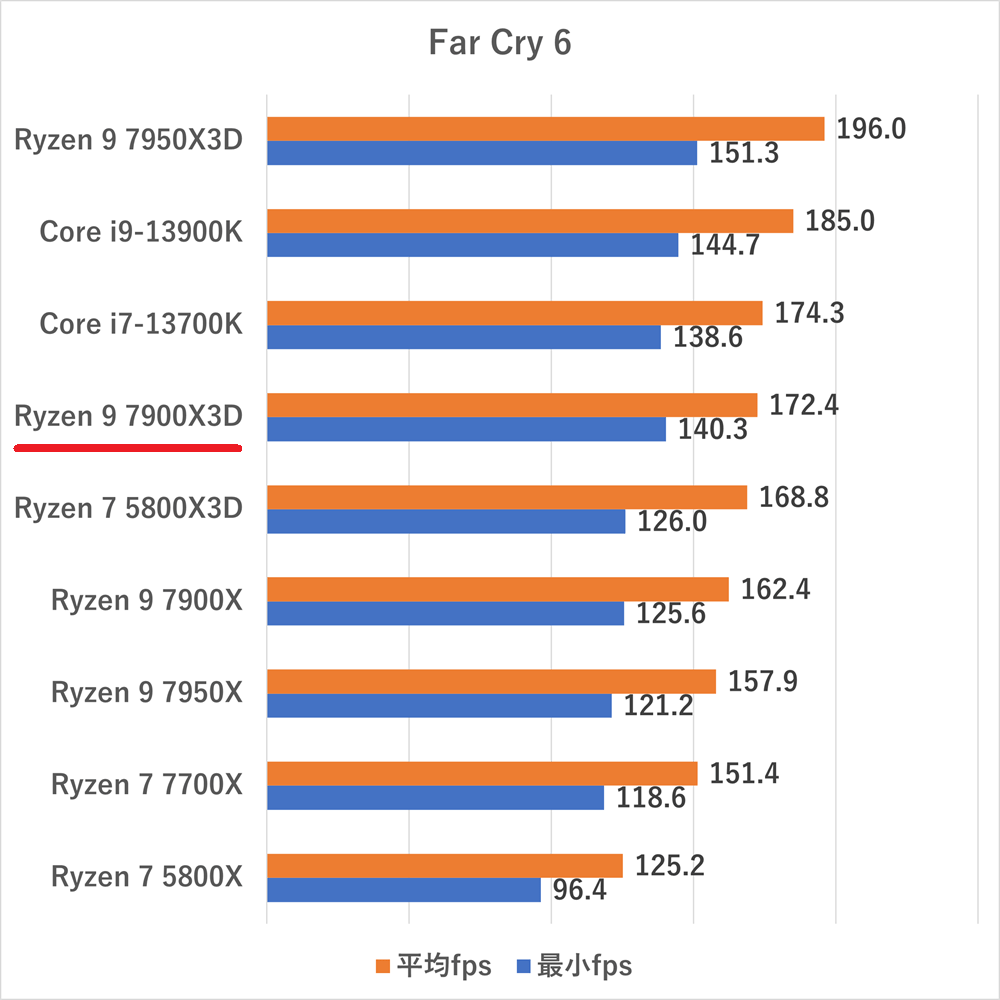
Yes, the AMD Ryzen 9 7900X3D is genuinely good for gaming, especially in titles that benefit from its significant L3 cache. Thanks to AMD's innovative 3D V-Cache technology, this CPU can deliver excellent frame rates, often rivaling or exceeding competitors in many scenarios. For the average gamer who enjoys a mix of competitive esports and graphically intensive single-player adventures, the 7900X3D offers a top-tier experience. It ensures smooth gameplay even with demanding settings, allowing you to immerse yourself fully without frustrating stutters or slowdowns.
However, it's important to understand its unique architecture. The 7900X3D features two Core Complex Dies (CCDs): one with 3D V-Cache and lower clock speeds, optimized for gaming, and another with higher clock speeds but no 3D V-Cache, better suited for productivity tasks. For optimal gaming, your operating system and game scheduler need to prioritize the V-Cache CCD. While modern Windows versions are generally good at this, some manual tweaking or BIOS settings might be needed for absolute peak performance, a small consideration for busy gamers wanting plug-and-play ease.
How Does the 7900X3D's 3D V-Cache Impact Gaming Frame Rates
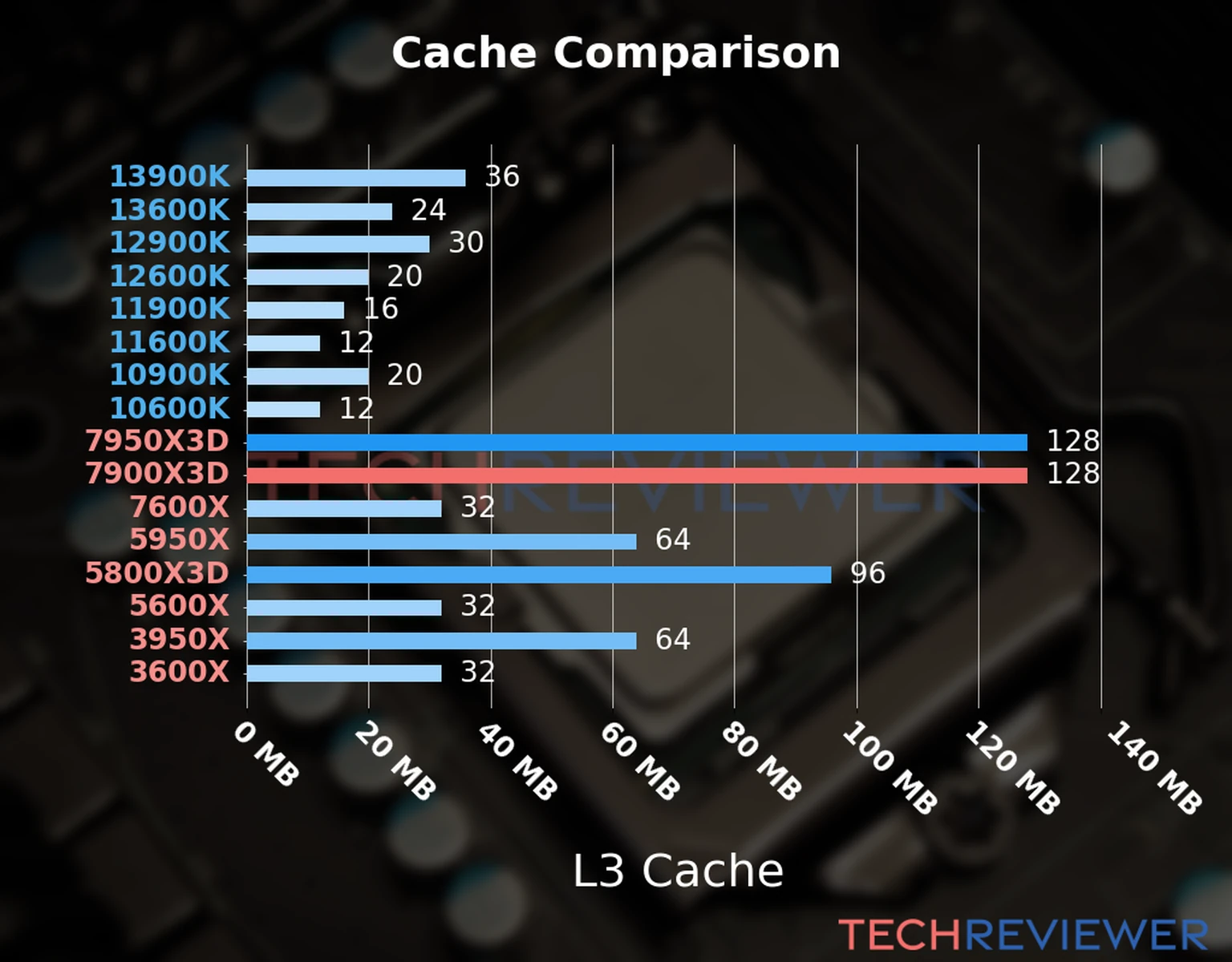
The 3D V-Cache is the secret sauce behind the 7900X3D's gaming prowess. By stacking an additional layer of L3 cache directly on top of one of its CCDs, AMD dramatically increases the amount of data the CPU can access almost instantly. This massive boost in on-die cache (up to 128MB combined for the gaming CCD) significantly reduces latency when the CPU needs to fetch frequently used game data.
In practical terms, this means higher average frame rates and, perhaps more importantly, better 1% and 0.1% lows. These low frame rates are crucial for a smooth gaming experience, preventing those jarring micro-stutters that can pull you out of the action. Games like simulators, complex strategy titles, and many open-world RPGs, which often make extensive use of CPU cache, see substantial gains. This translates directly to a more fluid, responsive, and enjoyable gaming session, whether you are trying to hit that headshot in a competitive shooter or exploring a vast virtual landscape.
Is the 7900X3D a Good Value for Gamers in 2026 Considering Price and Performance
Evaluating the 7900X3D's value in 2026 requires looking beyond just raw gaming numbers, especially for our audience who often balance gaming with other tasks. While it offers exceptional gaming performance, particularly for its class, its price point is definitely premium. For pure gaming enthusiasts whose primary goal is the absolute highest frame rate in every game, the Ryzen 7 7800X3D often offers a slightly better 'gaming-only' value due to its simpler single-CCD design that's entirely optimized for V-Cache gaming, usually at a lower cost. However, for those who also dabble in content creation, streaming, or heavy multi-tasking alongside gaming, the 7900X3D's higher core count on its non-V-Cache CCD provides a significant advantage.
It's a strong proposition for the 'prosumer' gamer or someone building a do-it-all machine. If your gaming involves keeping Discord, OBS, browser tabs, and a work application open, the 7900X3D handles this workload gracefully. This balanced performance across both gaming and productivity applications makes it a solid investment for the right user, offering excellent performance per dollar for a versatile high-end system.
What Type of Games Benefit Most from the 7900X3D's Architecture
The 7900X3D truly shines in games that are CPU-intensive and particularly benefit from large amounts of L3 cache. This includes a wide range of popular titles that many US gamers enjoy:
- Complex Simulation Games: Titles like Cities: Skylines II, Microsoft Flight Simulator, or Factorio thrive on large caches, as they constantly process vast amounts of game world data.
- Open-World RPGs: Games such as Starfield, Cyberpunk 2077, and Elden Ring often see significant performance uplifts, especially in busy areas with many NPCs or complex physics calculations.
- Strategy Games: Grand strategy titles like Civilization VII or Total War series benefit from faster AI processing and turn times.
- Esports Titles (High Refresh Rate): While many esports games are less CPU-bound, competitive players seeking to push ultra-high frame rates (240Hz+) in games like Valorant, CS2, or Apex Legends will still appreciate the consistent 1% lows and overall smoothness the 7900X3D provides.
These are the types of games where the extra V-Cache can turn a good experience into an exceptional one, offering noticeable improvements in smoothness and responsiveness that enhance immersion and competitive edge.
How Does the 7900X3D Compare to Other Top CPUs for Gaming
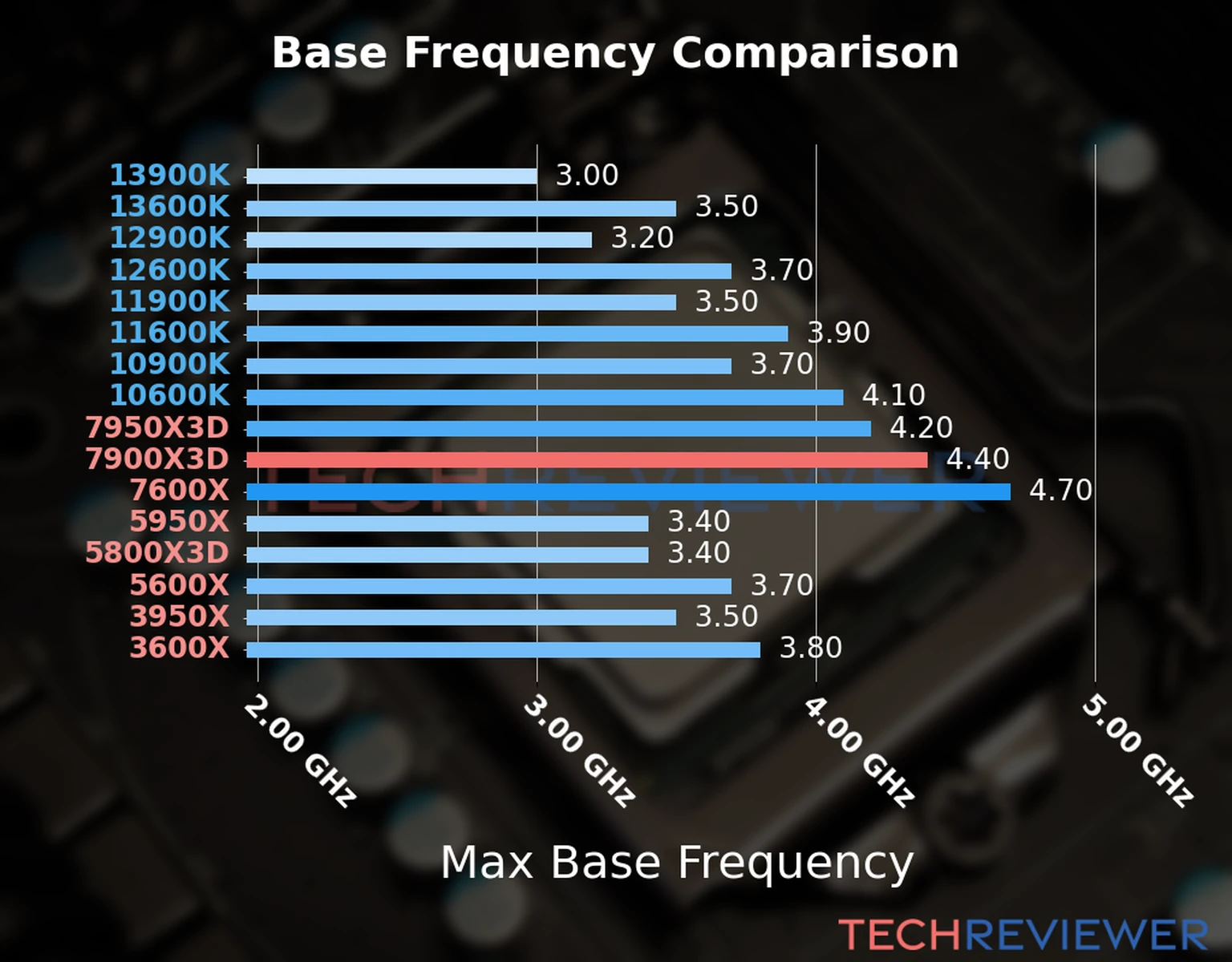
When stacked against other top-tier CPUs, the 7900X3D holds its own very well, often demonstrating its strength in gaming. Let's look at a quick comparison:
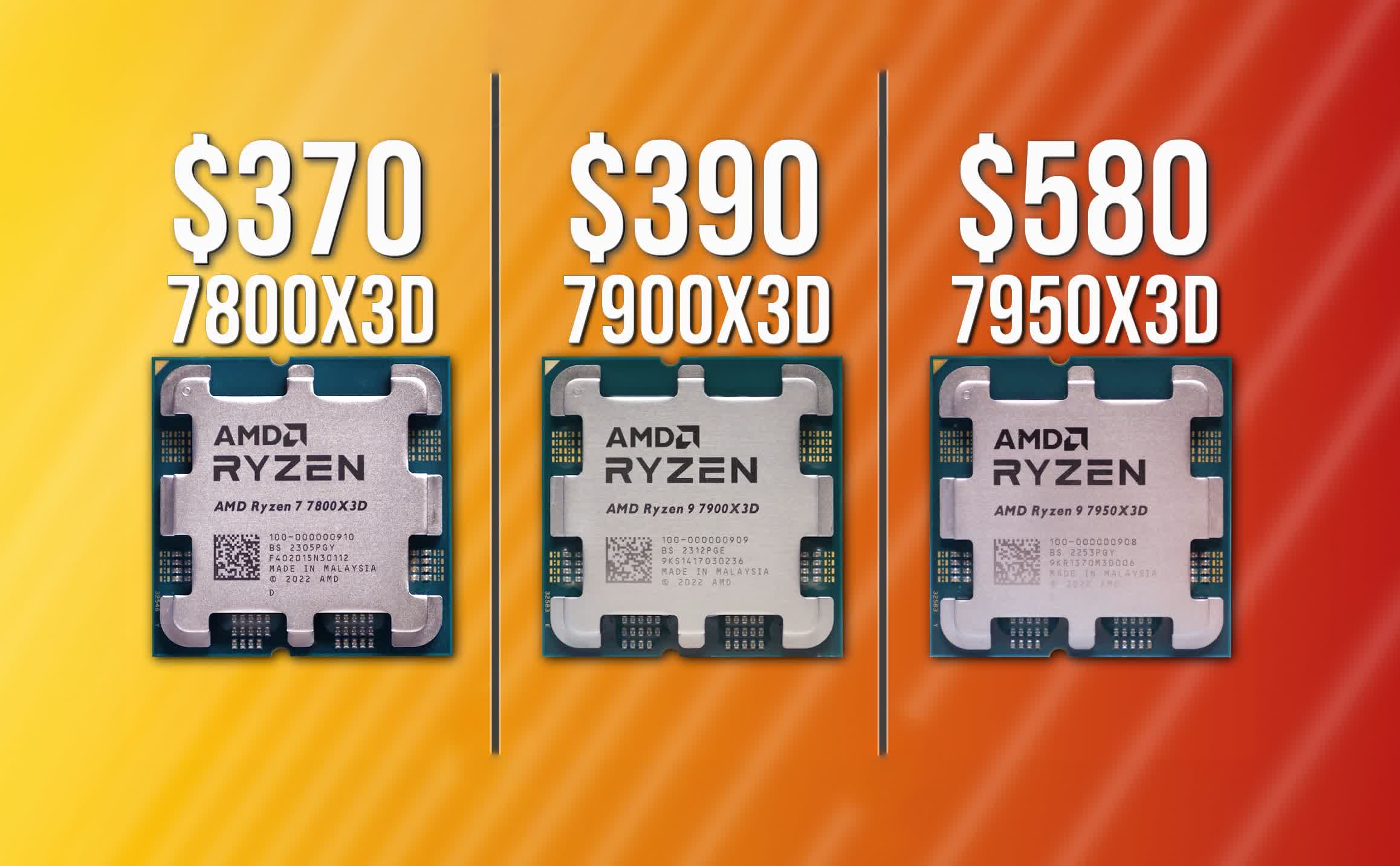
| Feature | AMD Ryzen 9 7900X3D | AMD Ryzen 7 7800X3D | Intel Core i9-14900K |
|---|---|---|---|
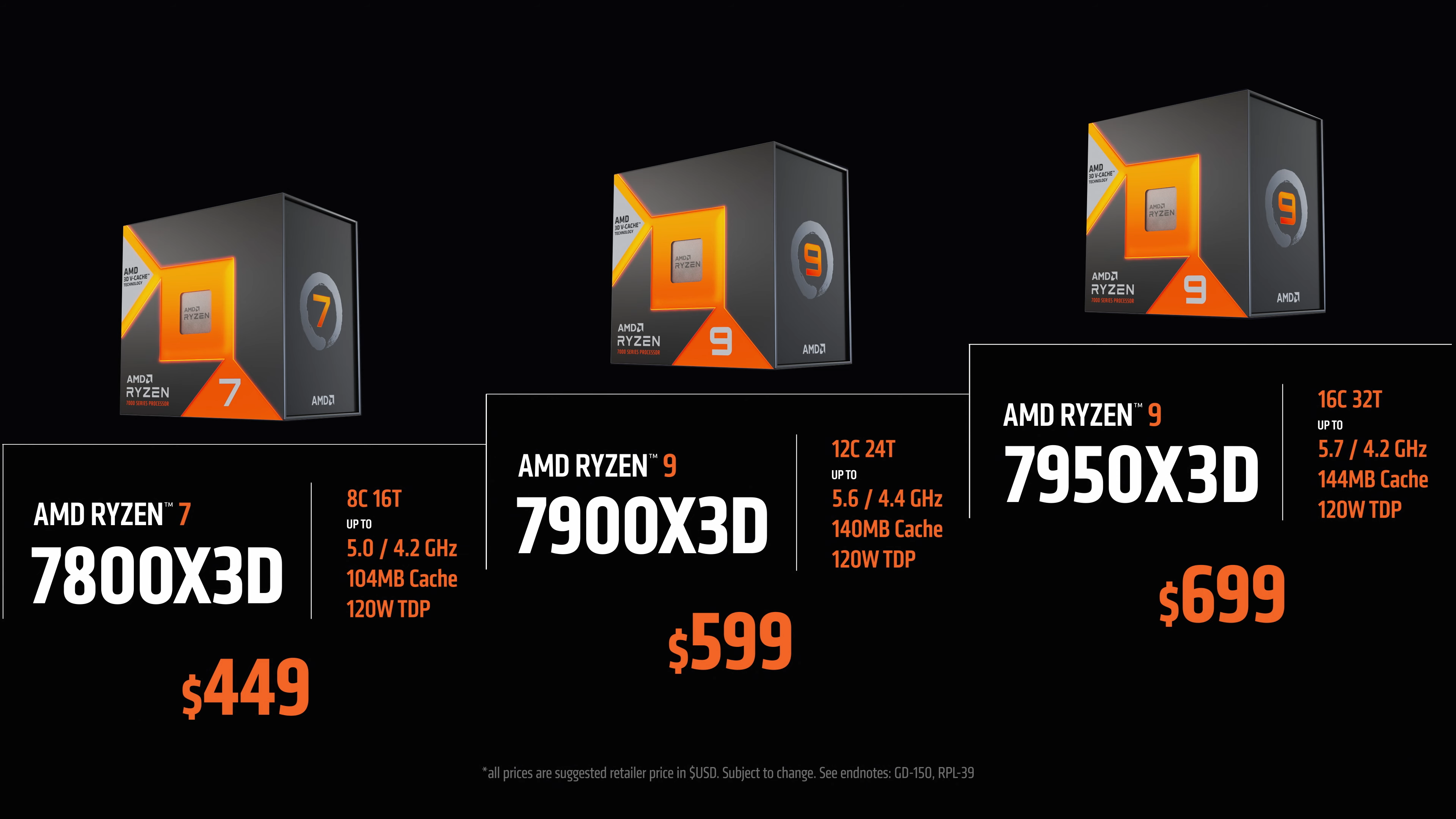
| Cores/Threads | 12 Cores / 24 Threads | 8 Cores / 16 Threads | 24 Cores / 32 Threads (8P+16E) |
| Gaming Performance | Excellent (especially cache-heavy games) | Best in class (pure gaming) | Excellent (especially high clocks) |
| Productivity | Very Strong (12 Zen 4 cores) | Good | Outstanding (high core count) |
| Power Consumption | Moderate (120W TDP) | Low (120W TDP) | High (125W-253W TDP) |
| Cache | 128MB L3 (3D V-Cache on 1 CCD) | 96MB L3 (3D V-Cache) | 36MB L3 |
| Value for Gamers | Great for balanced use | Best for dedicated gaming | Good for combined use, but hot/power hungry |
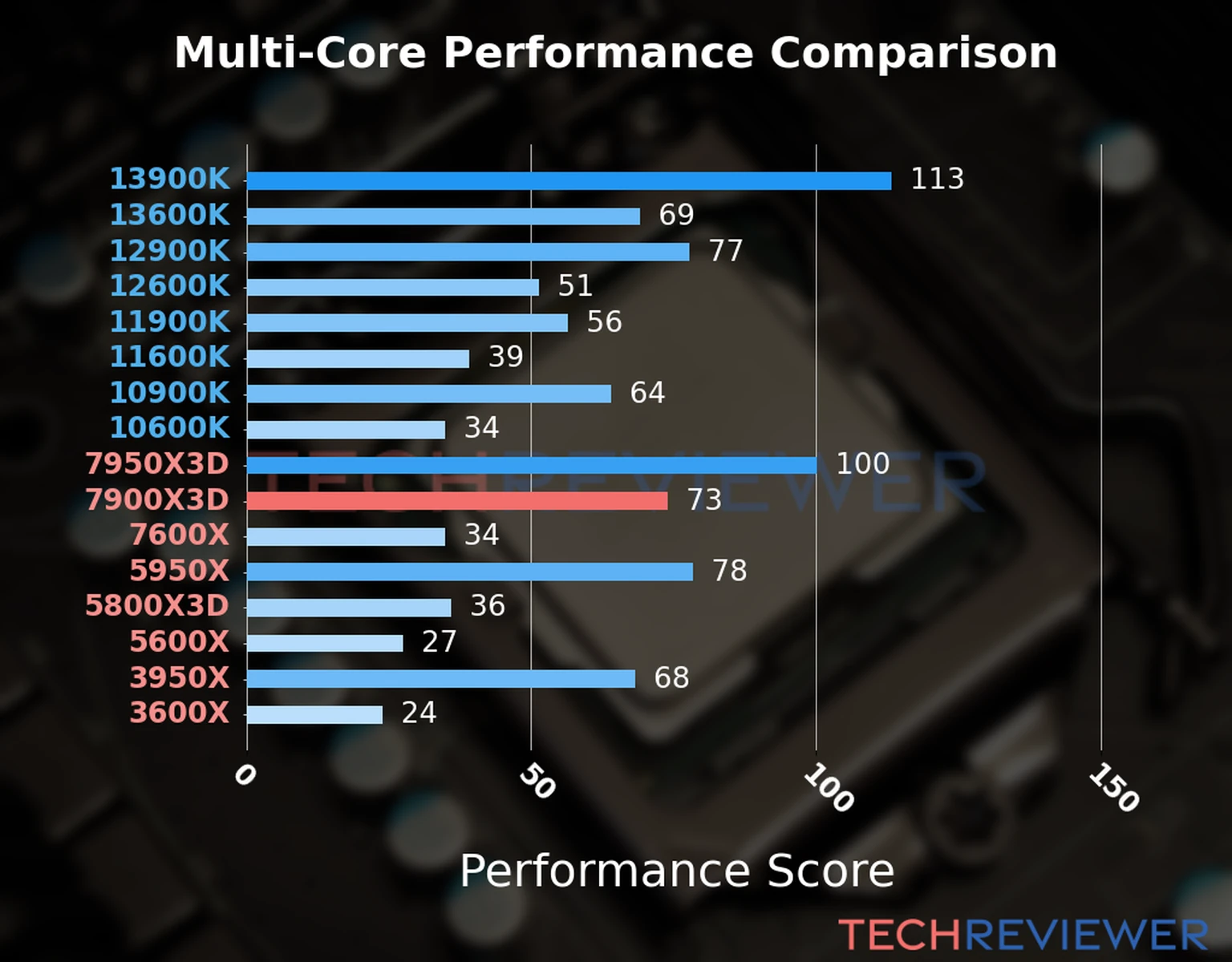
The 7900X3D stands out as a balanced performer. While the 7800X3D often slightly edges it out in pure gaming due to its fully gaming-optimized design, the 7900X3D offers superior multi-threaded performance for tasks beyond gaming, making it ideal for streamers or content creators. The Intel i9-14900K also offers fantastic performance but typically consumes more power and runs hotter, which can be a concern for many gamers.
What Are the Cooling Requirements for the 7900X3D in a Gaming PC
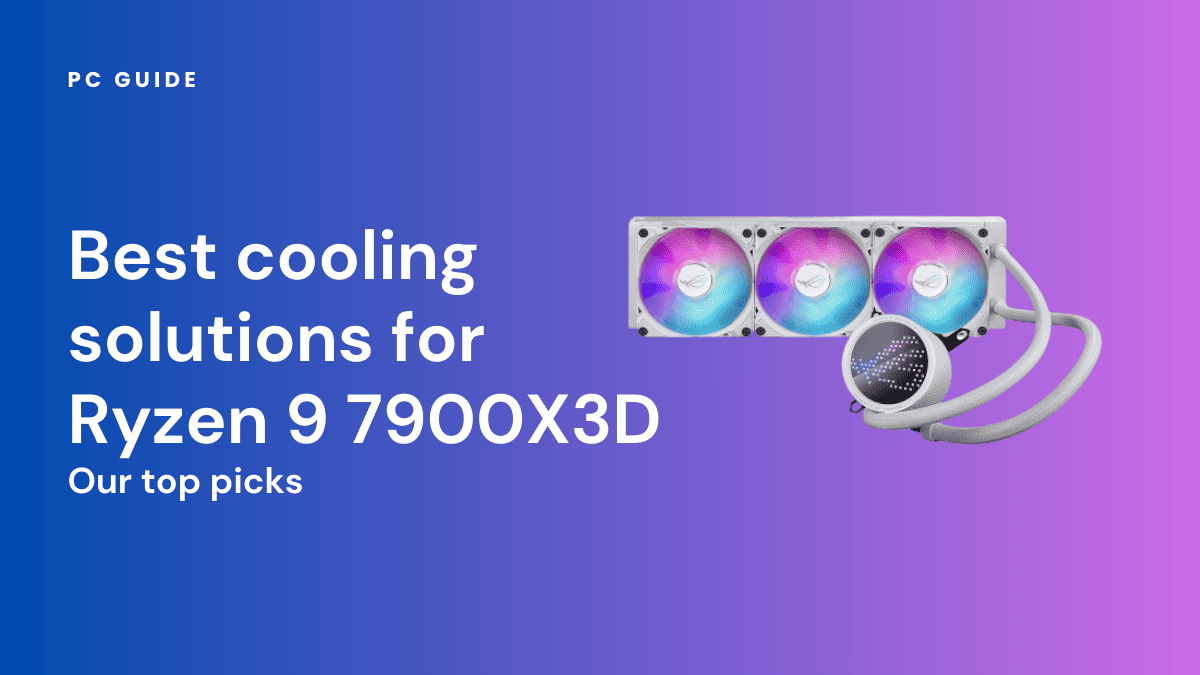
Despite its powerful performance, the 7900X3D is surprisingly efficient, boasting a 120W TDP. This means its cooling requirements are less demanding than some of its higher-wattage counterparts like the Intel Core i9 series. However, to truly get the most out of your 7900X3D and ensure it boosts to its full potential during extended gaming sessions, a robust cooling solution is highly recommended.
For casual gaming and general use, a good quality air cooler (e.g., Noctua NH-D15, DeepCool AK620) can suffice. However, if you're pushing high frame rates, plan on long gaming sessions, or use a smaller case, a 240mm or 280mm All-in-One (AIO) liquid cooler is often the best choice. This will keep temperatures well within limits, prevent thermal throttling, and extend the lifespan of your components. Remember, good cooling isn't just about preventing crashes; it's about maintaining consistent, peak performance.
Should I Consider the 7900X3D for a Balanced Work and Gaming PC Build
Absolutely, the 7900X3D is an excellent choice for gamers who need a PC that can do double duty for work or creative tasks. Its unique dual-CCD design is specifically tailored for this balance. The V-Cache CCD handles the gaming, delivering those high frame rates, while the second CCD, with its higher clock speeds and no V-Cache, powers through productivity applications like video editing, 3D rendering, or heavy multitasking. This versatility is a major plus for the average age 36 gamer who's likely juggling professional responsibilities alongside their passion for gaming.
Instead of having to compromise on either gaming performance or work efficiency, the 7900X3D offers a robust solution for both. It saves you the headache of building separate systems or constantly tweaking settings. For many, this makes it a very practical and smart investment, allowing you to seamlessly transition from conquering digital foes to conquering spreadsheets or creative projects.
What Are the Potential Drawbacks of Choosing the 7900X3D for Gaming
While the 7900X3D is a fantastic CPU, it does have a few considerations:
- Software Optimization: Achieving peak gaming performance sometimes requires ensuring Windows or specific game launchers correctly prioritize the 3D V-Cache CCD. While usually automatic, some users might need to make minor adjustments, which can be an extra step for those seeking a 'set it and forget it' experience.
- Cost: It's a premium processor. If your budget is extremely tight and your sole focus is gaming, the 7800X3D might offer slightly better gaming performance per dollar.
- Niche Benefit: The 3D V-Cache provides substantial boosts in cache-sensitive games. If your gaming library primarily consists of titles that don't heavily rely on cache (e.g., older or less CPU-intensive games), you might not see the full benefit compared to a non-X3D chip. However, with trends in 2026 showing increasingly complex game worlds, this 'niche' is growing.
These aren't deal-breakers, but they are worth keeping in mind to set realistic expectations and ensure it aligns with your specific gaming and usage patterns.
Tips for Optimizing Your 7900X3D for the Best Gaming Results
To ensure your 7900X3D is performing at its absolute best for gaming, consider these practical tips:
- Update BIOS and Chipset Drivers: Always keep your motherboard's BIOS and AMD chipset drivers up to date. These updates often include performance optimizations and better scheduling for X3D processors.
- Use AMD Ryzen Master: This utility can help monitor your CPU's behavior and ensure that games are correctly utilizing the 3D V-Cache CCD. You can also use it to manually pin game processes to the correct cores if you encounter issues, though this is rarely needed.
- Enable Game Mode in Windows: Windows Game Mode can help prioritize system resources for your active game. While not always a dramatic difference, every bit helps.
- Proper Cooling: As mentioned, a good cooler ensures your CPU can boost and sustain higher clock speeds during gaming without thermal throttling.
- Memory Speed: Pair your 7900X3D with fast DDR5 RAM (e.g., 6000MHz CL30 is often the sweet spot for AMD's Zen 4 CPUs) to maximize overall system performance.
Implementing these simple steps will help you unlock the full potential of your 7900X3D and enjoy a truly optimized gaming experience.
So, Is the 7900X3D good for gaming? The answer is a resounding yes, especially for the well-rounded gamer who wants top-tier performance not just for the latest AAA titles but also for their daily work or creative endeavors. It's a powerful, versatile chip that brings AMD's revolutionary 3D V-Cache technology to a broader audience, perfectly suiting those who need a single, capable machine to handle life's many demands without compromise. If you're looking for an investment that pays off in both thrilling gaming sessions and efficient productivity, the 7900X3D is a strong contender for your next build.
What's your biggest gaming challenge with your current setup? Comment below!
FAQ Section
Is the 7900X3D overkill for casual gaming?
For truly casual gaming (e.g., light indie games or older titles), the 7900X3D might be considered overkill. However, if 'casual' means playing the latest AAA games at 1440p or 4K with high settings, it provides excellent future-proofing and a consistently smooth experience.
Does the 7900X3D need a new motherboard?
Yes, the 7900X3D uses AMD's AM5 socket, which requires a compatible 600-series chipset motherboard (e.g., B650, X670). You will also need DDR5 RAM as AM5 only supports DDR5 memory.
Is the 7900X3D good for streaming while gaming?
Absolutely. With 12 cores and 24 threads, the 7900X3D excels at streaming while gaming. One CCD handles gaming with V-Cache, while the other provides ample core count for encoding your stream without impacting game performance, making it an ideal choice for content creators.
Can I overclock the 7900X3D?
While traditional all-core manual overclocking is generally not recommended for X3D chips due to their voltage limitations, you can use features like PBO (Precision Boost Overdrive) and Curve Optimizer to fine-tune performance and achieve better clocks within safe parameters. Focus on these methods for optimal stability and gains.
What graphics card pairs well with the 7900X3D?
The 7900X3D is a high-end CPU, so it pairs best with equally powerful graphics cards. NVIDIA's RTX 4070 Ti Super, RTX 4080 Super, or RTX 4090, or AMD's RX 7900 XT, RX 7900 XTX, or next-gen GPUs launching this year, would be excellent choices to avoid GPU bottlenecks.
AMD Ryzen 9 7900X3D offers strong gaming performance particularly with its 3D V-Cache technology which boosts frame rates in cache-sensitive titles. It provides a balanced approach for users who blend high-end gaming with productivity tasks due to its dual CCD design one optimized for gaming and one for general computing. While excellent for many games it requires proper configuration for optimal gaming focus and may not always outperform the dedicated gaming flagship 7800X3D for pure gaming scenarios. Its price point positions it as a premium option providing significant power but requiring careful consideration against single-purpose gaming CPUs.
35

AMD Ryzen 9 7900X3D Review Is It Worth It PC Guide Best For Ryzen 9 7900X3D . AMD Ryzen 9 7900X3D Gaming Processor DazBog Store 19 113 792 03 . AMD Ryzen 9 7900X3D Review Is It Worth It PC Guide AMD Ryzen 9000G Release Date Specs Price . Siri CPU Gaming Berkuasa AMD X3D Bakal Hadir Februari Ini Ryzen(TM) 7000 Series Processors With AMD 3D V Cache(TM) Technology Pricing And 1 33 Screenshot . AMD Ryzen 9 7900X3D Review A Fantastic Premium Performer But Its
Is The Ryzen 9 7900X3D CPU Good For Gaming Amd 7900x3d For Gaming.webp. Super Fast AMD Ryzen 9 7900X3D Gaming CPU Reaches New All Time Low AMD Ryzen 9 7900X3D Gaming Processor . AMD Ryzen 9 7900X3D Review A Fantastic Premium Performer But Its . Ryzen 9 7900X Vs Ryzen 9 7900X3D PC Guide Ryzen 9 7900X3D Good For Streaming . Buy AMD Ryzen 9 7900X3D AM5 Gaming Desktop Processor At Best Price Article

AMD Ryzen 7800X3D Vs 7900X3D Vs 7950X3D TechSpot 2024 03 28 Image 7 . Is The Ryzen 9 7900X3D Good For Gaming WePC Is Ryzen 9 7900X3D Good For Gaming . AMD Ryzen 9 7900X3D Review Is It Worth It PC Guide Best Cooling Solutions For Ryzen 9 7900x3d . AMD Ryzen 9 7900X3D Gaming Processor 1992699 Ryzen Pib With Characters . AMD Ryzen 9 7900X3D Review Is It Worth It PC Guide Best GPU For Ryzen 9 7900X3D

AMD S Beastly Ryzen 9 7900X3D Gaming CPU Drops To All Time Low Pricing . Ryzen 9 7900X Vs Ryzen 9 7900X3D PC Guide Ryzen 7 7800X3D Vs Ryzen 9 7900X3D . AMD Ryzen 9 7900X3D Review Is It Worth It PC Guide Ryzen 9 7900X3D . Ryzen 9 7900X Vs Ryzen 9 7900X3D PC Guide Is The Ryzen 9 7900X3D Good . Is The Ryzen 9 7900X3D CPU Good For Gaming Amd 7900x3d For Gaming.webp
Best CPU For Gaming In 2026 Tested Desktop Laptop Picks AMD Ryzen 9. Is The Ryzen 9 7900X3D CPU Good For Gaming Amd 7900x3d For Gaming.webp. Ryzen 9 7900X Vs Ryzen 9 7900X3D PC Guide Best CPU For RTX 5080 . AMD Ryzen 9 7900X3D Review Is It Worth It PC Guide AMD Ryzen 7 9800X3D Boxed On Table . Is The Ryzen 9 7900X3D CPU Good For Gaming Amd 7900x3d For Gaming.webp

Ryzen 9 7900X Vs Ryzen 9 7900X3D PC Guide Where To Buy AMD Ryzen 7 9800X3D . 5 BEST GPU For Ryzen 9 7900X3D With Benchmarks Tech4Gamers 51AZ0h7AQ5L . AMD Ryzen 9 7900X3D Review Is It Worth It PC Guide Best CPUs For RX 9070 XT And 9070 . Ryzen 9 7900X Vs Ryzen 9 7900X3D PC Guide Best CPUs For RTX 5070 And 5070 Ti . Is The Ryzen 9 7900X3D CPU Good For Gaming Amd 7900x3d For Gaming.webp

AMD Ryzen 9 7900X3D Processor Drops To 409 For The First Time Ever 96242 67 Amd Ryzen 9 7900x3d Processor Drops To 409 For The First Time Ever Grab Yours Now . AMD Ryzen 9 7900X3D Review Is It Worth It PC Guide Intel Core Ultra 9 285K CPU On Box Close Up Image By PC Guide . Is The Ryzen 9 7900X3D CPU Good For Gaming 288x288 Asus Rog Strix Z790 E Gaming Wifi 6e Motherboard. Ryzen 9 7900X3D 2026 PC Ryzen 9 7900X3D Farcry6 . AMD Ryzen 9 9950X3D And 9900X3D Announced At CES 2025 TechRadar