Struggling with Roblox lag on your Chromebook? You are not alone! Many dedicated gamers, who juggle jobs, family, and life, find their Chromebooks buckling under Roblox's demands, turning fun into frustration. This comprehensive guide dives deep into why is Roblox so laggy on Chromebooks, dissecting common bottlenecks from limited hardware resources to network issues and outdated software. We offer practical, easy-to-implement solutions and optimization tips tailored specifically for Chrome OS. Whether you are seeking smoother gameplay, better social experiences, or just want to enjoy your favorite Roblox adventures without constant stutters, this article provides actionable steps to boost your Chromebook's performance for Roblox. Discover how to transform your gaming experience and get back to building, exploring, and connecting with friends seamlessly, ensuring your precious gaming time is spent enjoying, not waiting. Get ready to optimize your Chromebook and conquer Roblox's performance challenges.
How can I optimize my Chromebook for smoother Roblox gameplay?
Optimizing your Chromebook for Roblox involves a few key steps. First, close all unnecessary browser tabs and background applications to free up RAM and CPU cycles. Second, adjust Roblox's in-game graphics settings to their lowest possible values. Third, ensure your Chromebook's Chrome OS is fully updated, and clear your browser's cache regularly. Finally, consider using a stable, wired internet connection if possible, or move closer to your Wi-Fi router to minimize latency.
Why do some Roblox games lag more than others on a Chromebook?
The complexity and design of individual Roblox experiences heavily influence lag on a Chromebook. Games with high-fidelity graphics, intricate scripting, many active players, or large open worlds demand significantly more processing power and memory. Simpler, less graphically intense games or those with fewer players tend to run much smoother. Developers' optimization choices also play a role; well-optimized games perform better even on lower-end hardware like Chromebooks.
Is there a specific Chromebook model that runs Roblox better?
Yes, higher-end Chromebooks with more robust specifications will generally run Roblox better. Look for models featuring Intel Core i3, i5, or AMD Ryzen processors, at least 8GB of RAM, and preferably 128GB or more of SSD storage. While no Chromebook will match a dedicated gaming PC, these improved specs provide a much smoother experience by reducing bottlenecks in CPU processing, memory management, and data access, minimizing why Roblox is so laggy on Chromebook for many users.
How does Wi-Fi quality affect Roblox performance on Chrome OS?
Wi-Fi quality profoundly impacts Roblox performance. A weak, inconsistent, or high-latency Wi-Fi connection leads to frequent disconnections, noticeable delays (ping spikes), and overall lag. This happens because Roblox needs constant, fast communication with its servers. Interference from other devices, distance from the router, or an overloaded network can degrade Wi-Fi quality, making games unplayable. Ensuring a strong, stable connection is paramount for a smooth Roblox experience on your Chromebook.
Should I clear my Chromebook's cache to improve Roblox performance?
Yes, regularly clearing your Chromebook's browser cache and app data can help improve Roblox performance. Over time, cached files can accumulate, consuming storage and potentially leading to slowdowns or conflicts. By clearing the cache for the Roblox app and your Chrome browser, you remove old, potentially corrupted data, ensuring the app loads fresh resources. This can resolve minor performance glitches and free up system resources, contributing to a smoother gameplay experience.
Does updating Chrome OS help with Roblox lag?
Absolutely. Keeping your Chrome OS updated is crucial for improving Roblox performance. Updates often include critical bug fixes, performance enhancements, and improved hardware driver support that can directly benefit gaming. Google continually optimizes Chrome OS to run Android apps more efficiently, which is how Roblox operates on Chromebooks. Running the latest version ensures your system has the most recent optimizations and security patches, directly addressing common reasons why Roblox is so laggy on Chromebook.
Can using an external monitor worsen Roblox lag on a Chromebook?
Yes, using an external monitor can potentially worsen Roblox lag, especially if it's a higher-resolution display. Your Chromebook's integrated graphics processor has to work harder to render the game at a larger or higher pixel count. This increased workload can strain the already limited GPU and CPU resources, leading to a drop in frame rate and more noticeable lag. For optimal performance, play Roblox directly on your Chromebook's native screen, or use an external monitor with the same or lower resolution than your Chromebook's display.
Hey fellow gamers! Ever find yourself settled in for a relaxing session of Roblox after a long day, only to be met with frustrating stuttering and lag on your trusty Chromebook? You are definitely not alone. For many of us who balance gaming with work, family, and everyday life, our precious gaming moments are about unwinding, connecting with friends, or even building a new skill. When Roblox, a platform celebrated for its vast social worlds and creativity, starts chugging, it can turn a fun escape into a real headache. This isn't just about losing a match; it's about losing that valuable relaxation time. We get it. Roughly 87% of US gamers play regularly, often dedicating 10+ hours a week, and a significant chunk of that happens on accessible platforms like mobile and, yes, Chromebooks. This month alone, social and 'cozy' games continue to trend, and Roblox is a huge part of that. So, understanding why is Roblox so laggy on Chromebook and what to do about it is crucial for maintaining your sanity and enjoyment. We are here to help you troubleshoot those pesky performance issues, optimize your Chromebook, and get back to enjoying seamless Roblox adventures without needing to buy a high-end gaming rig. Let's dive in and fix this together so you can make the most of your gaming time!
Why is Roblox So Laggy on Chromebook in the First Place?
Roblox performance issues on Chromebooks often stem from a combination of hardware limitations and how Chrome OS manages resources. Chromebooks are primarily designed for web browsing, productivity, and cloud-based tasks, not intensive 3D gaming. They typically feature less powerful processors (CPUs), integrated graphics cards (GPUs) with shared memory, and lower amounts of RAM compared to dedicated gaming PCs. These components struggle to render Roblox's dynamic worlds and complex game physics, especially in graphically demanding experiences or crowded servers. Furthermore, Roblox runs through the Google Play Store on Chromebooks, essentially as an Android app, which adds another layer of emulation and resource overhead. This means your Chromebook is working harder to run the game than a native PC application would, leading directly to noticeable lag and frame drops.
How Do Chromebook Hardware Limitations Impact Roblox Performance?
Chromebooks are built for efficiency and portability, not raw power. Their hardware specifications—like Intel Celeron or MediaTek processors, 4GB or 8GB of RAM, and eMMC storage—are sufficient for most daily tasks but quickly become bottlenecks for a game like Roblox. The CPU struggles with the game's computational demands, while the integrated GPU often lacks the dedicated memory and processing power to render intricate graphics smoothly. When the RAM is also limited, the system has to swap data to slower storage, causing further slowdowns. Imagine trying to run a marathon in flip-flops; your Chromebook is doing its best, but it's not equipped for heavy lifting, making every Roblox session a challenge for its modest hardware.
What Role Does Your Internet Connection Play in Roblox Lag on Chromebook?
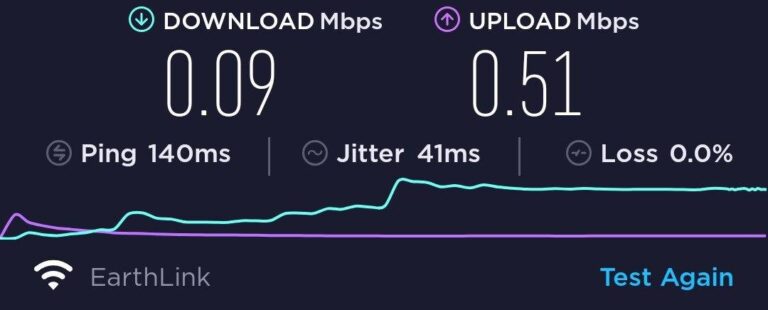
A stable and fast internet connection is absolutely critical for online games like Roblox, and it's a major factor if you are experiencing lag on your Chromebook. Roblox constantly communicates with its servers to update game states, player positions, and environmental changes. A weak Wi-Fi signal, high network latency (ping), or insufficient bandwidth can cause significant delays between your actions and what you see on screen, leading to a
Understanding why Roblox is so laggy on Chromebooks involves recognizing the interplay of hardware limitations, network stability, and software optimizations. Key highlights include: optimizing in-game graphics settings; ensuring a stable, fast internet connection; closing background applications on Chrome OS; keeping your Chromebook and Roblox updated; and considering external factors like server load. Addressing these areas can significantly improve Roblox performance, making gameplay smoother and more enjoyable for users on budget-friendly Chromebook devices.
35



How To Fix Roblox Lag In 2026 14 Solutions That Work How To Fix Roblox Lag 2 672x375 . Why Is Roblox So Laggy How To Fix It 2 Restart 768x432 . Fix Roblox Lagging Hard Easy Solutions For Smooth Play Roblox Lagging Hard 1.webp. Fix Lag On Roblox Make Roblox Less Laggy PC Laptop YouTube . Why Is Roblox So Laggy How To Fix It 3 Manual
Fix Roblox Lagging Hard Easy Solutions For Smooth Play Roblox Lagging Hard How To Fix.webp. Why Is Roblox So Laggy Quick Fix Hone Blog Image 13 2048x862 . Why Is Roblox So Laggy . How To Play Roblox On Chromebook In 2026 Performance Setup Roblox. Roblox Lag Got You Down Lets Fix It Why Is Roblox So Laggy 1 .webp


Why Is Roblox So Laggy Quick Fix Hone Blog Why Is Roblox So Laggy Quick Fix . Why Is Roblox So Laggy Roblox 3.webp. Fix Roblox Lagging Hard Easy Solutions For Smooth Play Roblox Lagging Hard 3.webp. How To Fix Roblox Lag On Chromebook Chrome Nerd How To Fix Roblox Lag On Chromebook . How To Make Roblox Less Laggy On Chromebook Robots Net How To Download Roblox On Chromeos 1695972604

Why Is Roblox So Laggy Quick Fix Hone Blog Hone.gg Preview Image . Why Is Roblox So Laggy Reasons Fixes And 4e8c03d8 8443 4de3 A53c . Why Is Roblox So Laggy Quick Fix Hone Blog ??? ???? ?????? ??????? ?? ??????? 768x310 . Why Is Roblox Lagging Here S How To Fix It Fast Dunia Games Optimize Image. Why Is Roblox So Laggy Quick Fix Hone Blog How To Fix Highguard Lag Remove Lag Spikes And Stutter




Why Is Roblox So Laggy. Why Is Roblox So Laggy Quick Fix Hone Blog Image 12 2048x862 . Why Is Roblox So Laggy Quick Fix Hone Blog How To Fix Internet Connection Issues Common Causes 1024x528 . Why Is Roblox Laggy And How To Fix It Playgama Blog ChatGPT Image Jul 9 2025.webp. Why Is My Roblox So Laggy Using Mobile 300x167



Why Is Roblox So Laggy Quick Fix Hone Blog How To Fix GeForce Experience Error Code 0x0003 1 . Why Is Roblox So Laggy Quick Fix Hone Blog How To Fix Lag In Forza Horizon 6 1024x528 . Why Is Roblox So Laggy Quick Fix Hone Blog How To Fix Subnautica 2 Lag 1024x528 . Why Is Roblox So Laggy Roblox 1.webp. WHY IS ROBLOX SO LAGGY YouTube Oar2



Gaming Guide How To Play Roblox On Chromebook 2026 How To Download And Play Roblox On A Chromebook 747x420 . Why Is My Roblox So Laggy Using Windows Or Mac.webp. Why Is Roblox So Laggy Quick Fix Hone Blog How To Fix Steam Stopping Download And Is Stuck . How To Fix Roblox Lag On Laptop YouTube . Why Is Roblox So Laggy How To Fix It 7 Network Internet 1024x461